

Most guides on this were written when a WHOIS lookup still printed a name and an address. That world ended years ago, and the protocol changed too. Here is what a lookup shows today, using a real domain, and what actually works when you need to reach the person behind it.
How to find out who owns a domain: the short version
- Look it up. Use Onymu's WHOIS lookup or ICANN's own Lookup tool. Both query RDAP where it exists.
- Read the registrar line. Even when the owner is hidden, the registrar is always shown. That is who holds the records.
- Use the relay contact. If the owner's email is redacted, the registrar must publish an anonymised email address or a web form that forwards to them.
- Escalate only with a reason. For legal, abuse or security cases, send a disclosure request to the registrar, or use ICANN's Registration Data Request Service.
WHOIS is gone for most domains. What replaced it?
ICANN announced that from 28 January 2025, the Registration Data Access Protocol (RDAP) "will be the definitive source" for generic top-level domain registration data, "in place of sunsetted WHOIS services". RDAP is not new. Registries and registrars have offered it since 2019. What changed is that it became the official answer.
RDAP returns structured data instead of a block of text, works over normal HTTPS, and supports different levels of access for different requesters. For someone asking who owns a domain, the practical difference is small: the same fields are public, and the same fields are hidden.
Not every extension has RDAP
IANA publishes a bootstrap file listing which extensions have an RDAP server. We compared the 20 November 2026 edition with the 1,400 extensions Onymu tracks. 206 of them have no RDAP server listed, almost all of them country codes. That includes three of the most popular startup endings: .io, .co and .me.
For those, the only source is the registry's old-style WHOIS service. A lookup tool that only speaks RDAP will simply fail on a .io domain. Onymu's lookup answers for these extensions too.
What a lookup shows today: a real example
Here is what RDAP returned for our own domain, onymu.com, on 21 November 2026. A .com lookup has two layers: the registry (Verisign) and the registrar.
| Field | Registry layer (Verisign) | Registrar layer |
|---|---|---|
| Registered | 29 Aug 2026 | 29 Aug 2026 |
| Expires | 29 Aug 2027 | 29 Aug 2027 |
| Registrar | Namecheap | Namecheap, with support email and phone |
| Name servers | Cloudflare | Cloudflare |
| Status | client transfer prohibited | same |
| Registrant name | not held | redacted |
| Registrant organisation | not held | privacy service |
| Registrant email | not held | one-off relay address |
That is the typical picture. The registry knows the domain exists and who sponsors it. The registrar holds the contact record, redacts the name, and in this case shows a privacy service as the organisation, with a forwarding address unique to the domain. Our piece on WHOIS privacy explains why owners choose this and what it does and does not hide.
What is always public
ICANN's Registration Data Policy, in force since 21 August 2025, lists what registrars and registries must publish: the domain name, registrar and its IANA ID, registrar abuse email and phone, creation and update dates, domain status, name servers and DNSSEC details. Those fields alone answer a lot: how old the domain is, when it expires, where its DNS is hosted, and who to contact about abuse.
Why the owner is hidden
The same policy requires registrars to redact personal data where the law requires it, and allows them to redact it where they have a "commercially reasonable purpose" to. In practice many registrars redact by default, for every customer, rather than working out whose data is protected by which law.
How to contact a domain owner when the details are hidden
Use the relay email or web form
This is the route most people miss. When a registrar redacts the email, the policy says it "MUST Publish an email address or a link to a web form" that reaches the contact without identifying them. The relay address in the lookup result is real and forwards to the owner. If you want to make an offer on a domain, this is where it goes, politely and specifically.
Send a disclosure request to the registrar
Every registrar must publish how to request non-public data, linked from its homepage, and must respond to requests that meet its format. Expect to explain who you are, why you need the data and what you will do with it. A trademark or abuse case qualifies. Curiosity does not.
Use ICANN's Registration Data Request Service
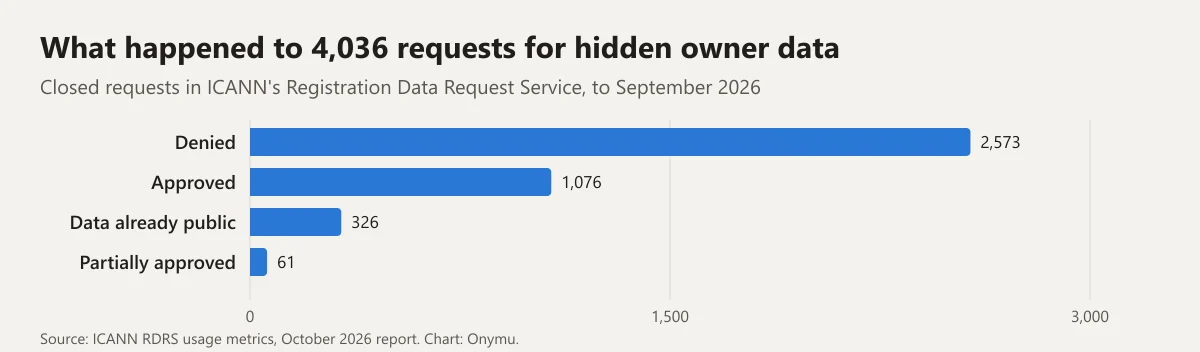
ICANN runs the Registration Data Request Service (RDRS) as a single front door for these requests, for anyone "with a legitimate interest". The board extended it for up to two more years after the pilot ended in November 2025. ICANN's own usage report for the period ending September 2026 shows how it goes in practice:
| Outcome of closed requests | Count | Share |
|---|---|---|
| Denied | 2,573 | 64% |
| Approved | 1,076 | 27% |
| Data already public | 326 | 8% |
| Partially approved | 61 | 2% |
Of 4,036 closed requests, about a quarter were approved. The two most common reasons for denial were an incomplete request (948) and a registrar unable to disclose under applicable law (908). Only 79 registrars participate, so for many domains RDRS just passes you a form to send to a non-participating registrar. Approved requests took 8 days on average. Write a complete request the first time.
When you actually need to know
You want to buy the domain. Use the relay contact, or a broker. You do not need the owner's identity to make an offer.
Someone is using your trademark. A disclosure request with evidence of the mark is the start. If that fails, the UDRP dispute process is the usual next step for trademark owners.
The domain is sending phishing or malware. Skip the owner. Report it to the registrar's abuse contact, which is always public, and to the host shown by the name servers.
The domain was stolen from you. Start with your own registrar, not the new owner. Our guide to recovering a stolen domain walks through it.
Frequently asked questions
Is WHOIS still available?
For generic extensions like .com, ICANN made RDAP the definitive source on 28 January 2025 and described WHOIS as sunsetted. Many country codes, including .io, .co and .me, still have no RDAP server, so WHOIS remains the only option for them.
Can I see who owns a domain for free?
The public part, yes: registrar, dates, status and name servers are free to look up. The owner's name and contact details are usually redacted, and getting them requires a legitimate reason and a request to the registrar.
What does "REDACTED FOR PRIVACY" mean?
The registrar holds the data but is not publishing it, usually because privacy law requires it or because it redacts for every customer by default. It does not mean the owner is hiding anything unusual.
How old is a domain?
The creation date is always public. Look for "registration" or "Creation Date" in the lookup result.
What to do next
Run the domain through Onymu's WHOIS lookup, which covers .com and the other generic extensions as well as .io, .co and the other country codes without RDAP. If the domain turns out to be taken and you were hoping to use the name, domain search will show which other extensions are still free.
